
To, Cc, Bcc and templates
Several recipients, each address checked, templates for subject and text, your own signature, confidentiality notice and read receipt.
Softstringsphone Pro · The multitool
Softstringsphone Pro turns your Android phone into a handset for your FRITZ!Box: with live captions, call notes and a call screening assistant that asks unknown callers first. Plus a fax section and ten PDF tools.


Or download the APK directly →
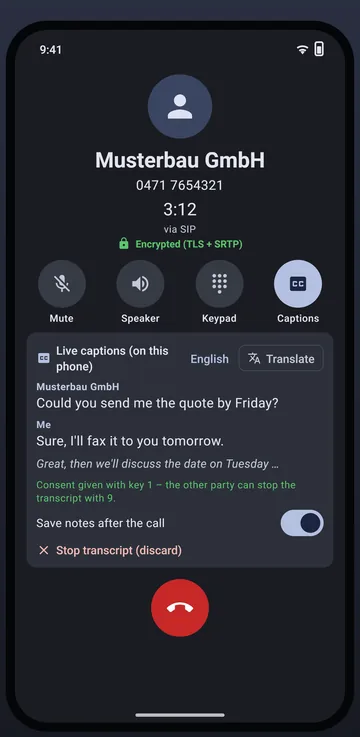
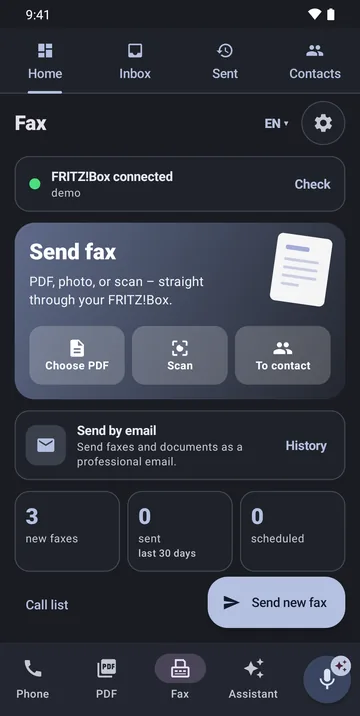
Phone
Incoming and outgoing calls via the FRITZ!Box on your home network or via SIP – encrypted with TLS and SRTP with providers that support it. On the go, the Router VPN app connects your phone to your box.
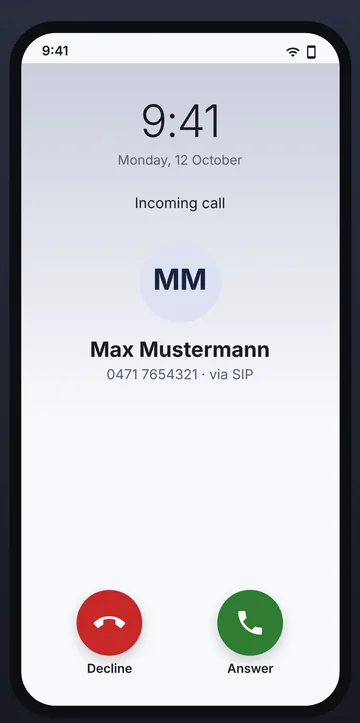
Incoming calls ring full screen, even on the lock screen. The dial pad searches all lists via T9: history, favourites, the box’s call list and phone book, and your contacts.
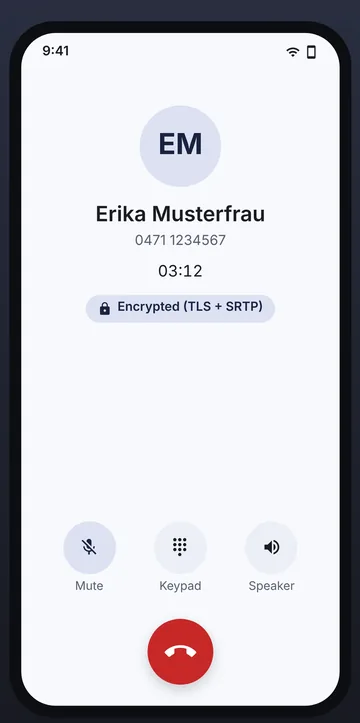
During a call, a padlock shows whether the connection is encrypted. Noise suppression filters fans, traffic and keyboards out of your voice – with its own signal processing on the device.
AI front desk
Captions, translation, notes and call screening run on the device. There’s no cloud AI, and online recognition is never used during a call.
Both sides of the call as text, with speaker labels – using the system’s offline recognition (Android 13 and later) or the app’s AI language pack, which also runs on older devices. Translated into your language if you like.
After the call, the app summarises the reason, topics, tasks with owner and deadline, dates, numbers and amounts. Share it, add it as an appointment or go straight to “Send fax”.
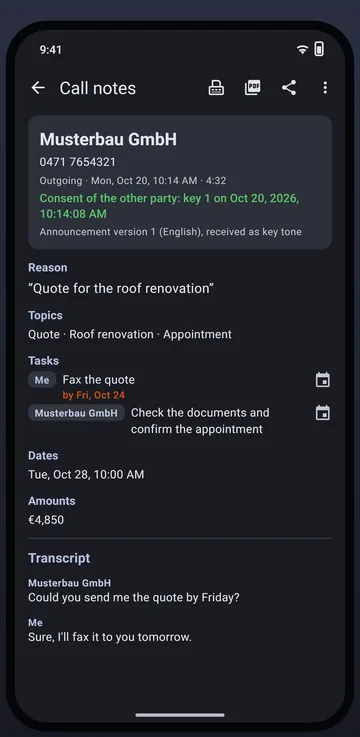
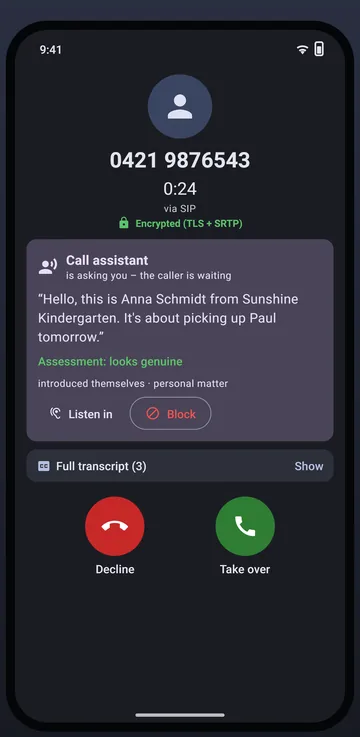
Unknown and withheld numbers are answered by the assistant first: it asks for the caller’s name and reason and shows both as text. You decide – take over, reject, block or listen in.
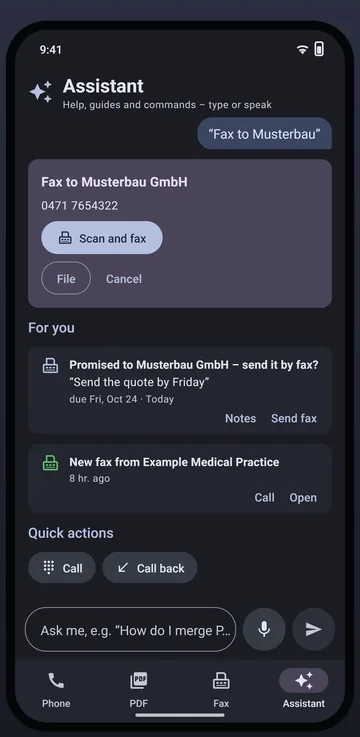
Typed or spoken: “Fax Musterbau”, “Call back the last missed call”, “Merge PDFs”. The “For you” card reminds you of documents you promised, failed faxes and callbacks.
Fax and PDF
The fax section is powered by Fritten&Fax: sending via FRITZ!Box or SIP, fax storage, cover page, transmission report. The PDF tools edit documents losslessly on the phone.
Send faxes from PDFs, photos or scans – with cover page, automatic retries and transmission report. Received faxes from the box’s storage appear in the inbox; if you like, the app answers faxes itself on your home Wi-Fi.
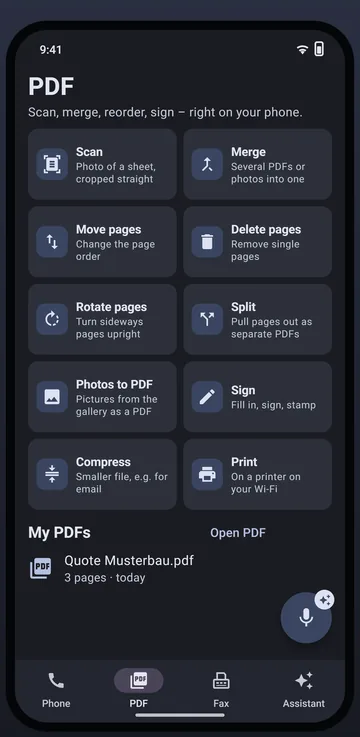
Scan, merge, split, move, delete and rotate pages, photos to PDF, sign, compress and print. “My PDFs” keeps everything ready with previews – send as a fax with one tap.
Faxes, scans and PDFs can also go out as an e-mail – from the fax section and from “My PDFs”, even without a FRITZ!Box set up. All free of charge.
Several recipients, each address checked, templates for subject and text, your own signature, confidentiality notice and read receipt.
Combine documents into one PDF, compress them and protect them with a password (AES-256) – right on the phone.
Via your own mail server in the background, with history and scheduled sending – or via your mail app. Forwarding of received faxes goes to several recipients, with a result for each fax.
FRITZ!Box
Softstringsphone Pro sets itself up and keeps the phone book and blocked numbers in sync with the box.
The app finds your FRITZ!Box on the home network by itself – no need to type in an IP address.
Creates the IP phone in the box, with a random user name and a 20-character password, and checks the registration.
Create, edit and delete contacts in the box – sync with the phone, with preview.
Blocked numbers can go into the FRITZ!Box call barring if you like – for all phones.
With the PC
Softstringsphone Pro stays free. The edition on the PC decides which companion features are available: pairing always works, full collaboration comes with Fritten&Fax Pro or Business.
A photo of the QR code on the PC or a 16-digit code – directly on the home network or via VPN, end-to-end encrypted.
With Fritten&Fax Pro on the PC: send faxes with the PC’s sender profiles – with status, cancellation and report.
With Pro on the PC: new faxes on the PC as a notification, in the inbox and in the widget.
With Pro on the PC: take over FRITZ!Box access, then create your own IP phone at the push of a button.
Interfaces
Everything is switched off until you switch it on.
Call and fax events as signed JSON to Home Assistant, Node-RED, n8n or your CRM.
Android broadcast to the app of your choice – without call content.
A link template with number and name opens the matching record in your system.
With fingerprint, face or screen lock; calls and faxes keep running in the background.
Technical data
| Android | Android 8.0 or later on a 64-bit phone (arm64); captions with system recognition from Android 13, translation from Android 12 |
|---|---|
| Telephony | CAPI over TCP on the home network; SIP over UDP or TLS 1.2/1.3 with SRTP; Opus (narrowband, dynamic bitrate) or G.711 |
| Fax | Sending and receiving via the FRITZ!Box CAPI or via SIP (G.711, T.38) – even without a FRITZ!Box; the box’s fax storage |
| On-device AI | AI language pack for captions (downloaded from our own server), optional local language model (1.1 GB) |
| Companion | Fritten&Fax for Windows 4.1 or later; full features with Pro or Business on the PC |
| App languages | German, English, French and Spanish |
| Price | Free, with no ads and no in-app purchases |
Questions about Softstringsphone Pro
Nothing. The app is free and shows no ads. The companion features with the PC depend on the edition of Fritten&Fax for Windows.
No. Softstringsphone Pro handles one call at a time and offers no hold, transfer, conference or voicemail. Its strength is the combination of FRITZ!Box phone, fax, PDF and AI on your phone.
Yes – with a VPN to your box, for example with our free Router VPN app. Without a VPN, a SIP call may drop when you switch networks.
With SIP over TLS with SRTP – a green padlock shows it. The FRITZ!Box doesn’t offer TLS to its IP phones; calls are then only encrypted with SIP providers that support TLS.
If you mainly fax: Fritten&Fax also has text recognition and Pro/Business on the phone. Softstringsphone Pro is the multitool when you want phone and AI as well.
On Google Play and in the Galaxy Store – or as an APK for direct installation.