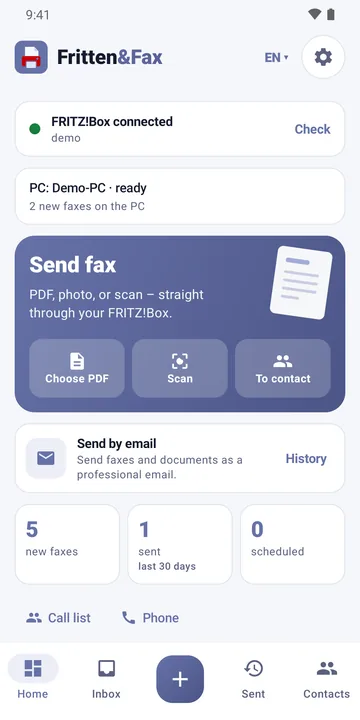
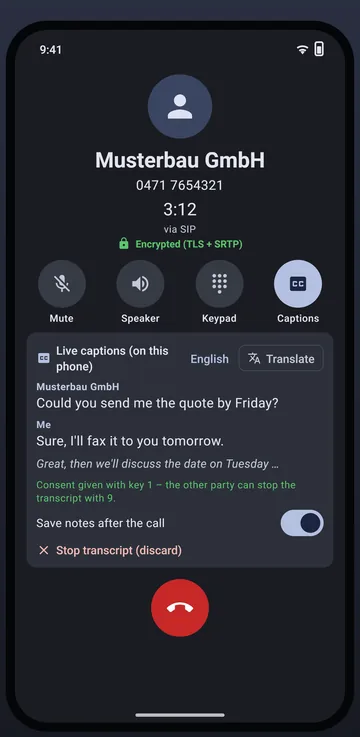
Two apps, two focuses: Fritten&Fax for Android is the work tool for faxing. Softstringsphone Pro is the multitool built around the phone – with a fax section, PDF tools and an AI assistant. Both work together with Fritten&Fax for Windows.
The two apps
The work tool
Fritten&Fax for Android
Focused on fax: scan, check and send documents – via the FRITZ!Box or SIP, even without a box at all. With Pro, the phone answers faxes itself and makes them searchable with text recognition.
For anyone who faxes delivery notes, orders and forms on the go – in field service, on the building site or when working from home.
Your FRITZ!Box phone on your mobile – with live captions, call notes and a call screening assistant that asks unknown callers first. Plus a fax section and ten PDF tools.
For anyone who makes calls on their mobile using the landline number and wants fax, PDF and notes in one app.
Calls via CAPI and SIP, with TLS and SRTP with SIP providers
incoming and outgoing, full screen on the lock screen
Live captions and call notes
not included
included
Call screening and voice commands
not included
included
Together with the PC (companion)
Pairing with Free; fax through the PC and the PC’s fax inbox with Pro
Pairing with Free; fax through the PC and the PC’s fax inbox with Pro on the PC
Licence
Free, Pro, Business – key from the PC
free, no licence
Ads
Free: small banner, never while faxing; Pro: none
none
Company phones via MDM
Business
not included
Interface languages
German, English, French, Spanish
German, English, French, Spanish
Google Play services
for scanner, text recognition and QR code
not required
Decision guide
Three questions to find the right app
Do you have a FRITZ!Box with a fax function?
Yes: Both apps fax through it.
No: Both apps also fax via SIP directly through your provider.
Do you want to make calls on your mobile using the landline number?
Yes: Softstringsphone Pro is built for that – with captions and call screening.
No: Fritten&Fax for Android is all you need.
Do received faxes need to be searchable?
Yes: Fritten&Fax for Android with Pro recognises the text on the phone.
No: Both apps show your FRITZ!Box’s fax storage.
Both together? No problem: the apps can be installed side by side. Many people use Softstringsphone Pro for calls and Fritten&Fax for Android for everyday faxing.
Try them for free
Both apps are free in the store. Find out which one suits your daily work better.